Community platform: build a paid community and sell memberships in your own store
With Merchavio you build a community with channels for chat and announcements, livestreams, events and downloads, and sell the membership through your own store. Whoever pays is a member straight away; when the subscription ends, so does the access. The money goes straight to your Stripe account, and your members install the community as an app with your name.
5-day free trial · no credit card · no cost per member
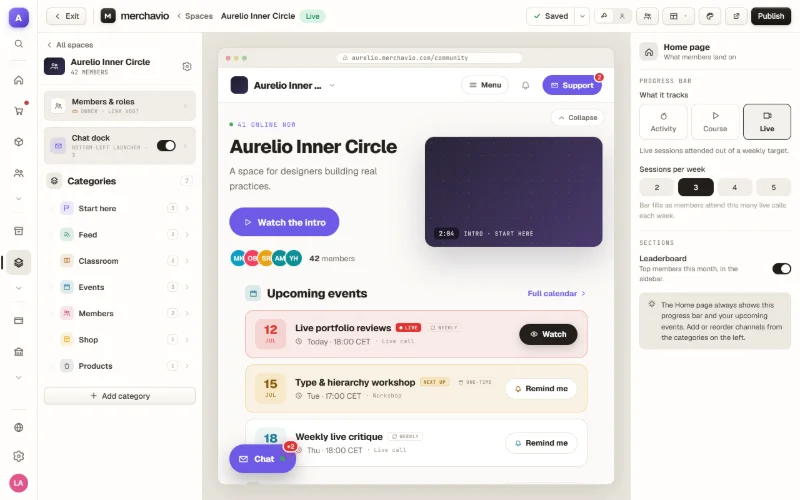
What is a community platform?
A community platform is software where your members talk to each other, meet at live sessions and find content that is only there for them. For a paid community it also controls who is in: whoever pays gets access, whoever cancels loses it. People looking for a community platform usually end up with one of three approaches:
Group on a social network
Quick to set up and free. You handle payment and access yourself, though, and the network decides on reach and rules.
Your own forum
Full control over design and data. Servers, updates, payments and member management are up to you or need extra tools.
Community with your own store
Community, checkout and member management are connected: buyers become members automatically, and you sell courses or ebooks in the same store. Merchavio follows this model.
Which approach suits you depends on whether you want to earn money with your community and how much of the technology you want to run yourself. You can work out what a membership costs on different platforms with your own numbers in the fee calculator.
What the Merchavio community platform does
Everything for a paid community is included in every plan, with no cost per member. The plans differ in limits such as storage and live allowance, and in the fee per payment.
Voice lounges
In a lounge members open a room and talk to each other, like at a regulars’ table. You switch on cameras per lounge when you need them.
Events with a meeting link
One-time or weekly events appear in the community calendar. A link to Zoom or another meeting tool is visible to members only, and whoever taps Remind me gets an email with the link when the event starts.
App, bell and push
Members install the community on their phone as an app with your name and icon. When someone mentions them with @, they hear about it through the bell, by email and, if they like, by push. With @everyone you reach all members.
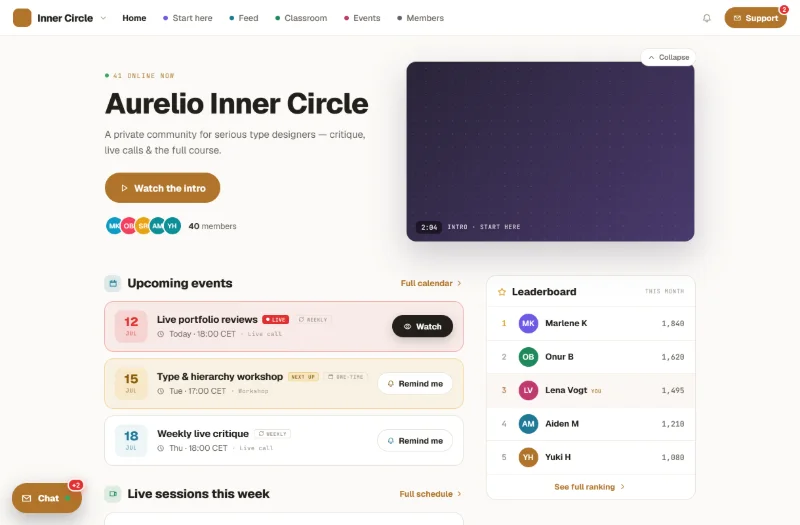
What your members see
Your community lives at your store’s address or on your own domain. After buying, the welcome email brings members in with one click; later they sign in with their email address and a code or with their password.
On the start page they see your intro video, the next events and the leaderboard. One click takes them to the livestream, the chat or the downloads.
Five steps to your first paying member
Create an account
Start the 5-day trial, no credit card needed.
Connect Stripe
Connect your Stripe account in the settings. From then on, payments go straight to you.
Guide: connect StripeCreate the community
Create a community under Products. It starts with empty channels such as “Start here”, “Announcements” and “Events”, which you rename, add to or delete in the community builder, for example with a chat channel.
Guide: create a paid communitySet the price
In the Pricing tab there is already a plan called “Monthly”; enter your monthly price there. For an annual plan click “Add plan”, choose “Annual”, enter the annual price and give the plan a name such as “Yearly”. Check the checkout in a private browser window after publishing.
Guide: prices and subscriptionsPublish and plan the first event
Publish the community and share the sales page. Add a first live event to the calendar so new members have a reason to drop by right away.
Guide: start a livestream
What does the community platform cost?
You pay a fixed monthly price and a fee per payment, including every subscription renewal. There is no cost per member and no limit on how many members you have. All prices exclude VAT; Stripe’s payment fees are added.
| Starter | Growth | Scale | Plus | |
|---|---|---|---|---|
| Price per month | €19 | €49 | €129 | €499 |
| Fee per sale | 1.9% + €0.25 | 1.6% + €0.25 | 1.4% + €0.25 | 1.2% + €0.25 |
| Course video traffic per month | 100 GB | 500 GB | 2 TB | 8 TB |
| File storage | 10 GB | 50 GB | 200 GB | 1 TB |
| Team seats | 2 | 5 | 15 | 50 |
Prices excl. VAT. Every plan includes store, courses, community, livestreams and back-office. Annual plan: 10 monthly prices for the first 12 months. All plan details
Calculate with your community
At the same revenue, the next plan up becomes cheaper from these monthly revenues: Growth from about €10,000, Scale from about €40,000, Plus from about €185,000. To see what other platforms cost with your numbers, use the fee calculator.
Who Merchavio suits as a community platform
A good fit if you …
- … want to sell a paid community under your own name, with your own store, your own customer list and the money going straight to your account.
- … go live regularly, run events and want recordings and downloads in one place.
- … sell courses, ebooks or coaching alongside the community and don’t want to connect several tools for it.
Less suited if you …
- … need a community where members comment on posts, like them and message each other privately. With Merchavio, members write messages in channels and mention each other with @.
- … want to unlock channels or content depending on the price tier. With Merchavio, all members see all channels.