Products: overview and guides
Sell an ebook as a download: deliver the file after purchase
To sell an ebook as a download, you upload the file once and Merchavio delivers it to every buyer automatically. Buyers find it in their library right after paying, and the same works for workbooks, templates and bonus files with any product.
What works as a download
A download suits anything finished that buyers keep: an ebook, a workbook, a template pack, sheet music, presets. With a course or coaching it is a bonus, for example a PDF with all slides.
The steps in Merchavio
Screenshots from Merchavio with sample data. The coloured frame shows where to click.
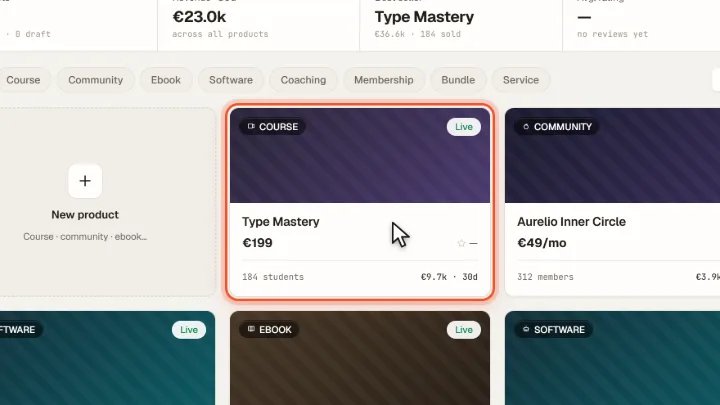
Open a product
Open Products and click the product. For an ebook the upload is in the first tab under What buyers download.
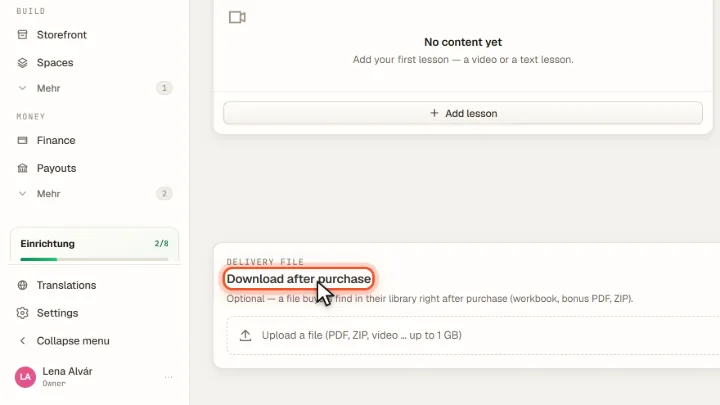
Upload the file
For other product types, Download after purchase is in the first tab. Upload one file: PDF, ZIP, video and more, up to 1 GB. Ersetzen swaps it, Entfernen removes it.
Buyers download the file
After paying, buyers open their library and download the file there. Only buyers of the product get the download.
Tips from practice
- Put several files into one ZIP. Each product delivers one file.
- Replace instead of re-creating when you update the ebook: buyers then download the new version.
Common mistakes
- Files larger than 1 GB. Compress videos or split large packs across several products.
- Forgetting the storage limit. Delivery files count towards your plan's storage.
Frequently asked questions
Which file types can I deliver?
PDF, ZIP, video and other files, up to 1 GB per product.
Can people download the file without buying?
No. The download only works for logged-in buyers of the product.
Related guides
Set up the member area for your buyers
The library your buyers log into.
Read →Products · GuideSet prices and subscriptions for digital products
One-time, monthly, annual or free.
Read →Media · GuideUpload, find and delete files in the media library
Upload, find, download and delete.
Read →