Bookkeeping: overview and guides
Bookkeeping for digital product sellers: receipts and accountant access
If you sell digital products, good bookkeeping starts with tidy receipts. In Merchavio you file every invoice and bank statement by month, find it again in seconds and give your accountant their own read-only access instead of emailing files back and forth.
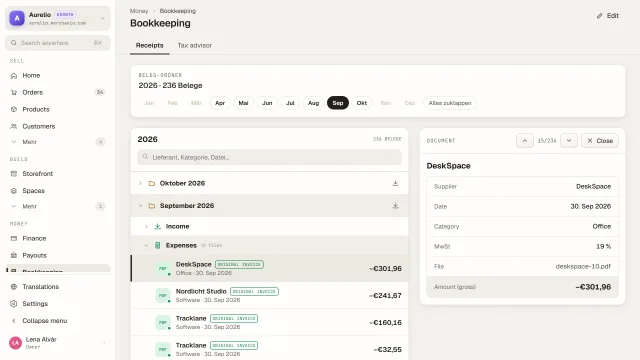
How the receipt folder works
The Receipts tab is a folder tree: year, month, folder, document. Every month has three fixed folders: Income for outgoing invoices and revenue reports, Expenses for incoming invoices and receipts, and For the tax advisor for bank statements, contracts and records. You can add your own folders, for example for travel costs.
Documents get into the folder when you upload them. For income and expenses you enter supplier, gross amount, VAT rate and category, so the monthly overview adds up. Each month can be downloaded as a ZIP file with all documents and an overview table.
Merchavio prepares the documents for your bookkeeping, it does not replace it. Booking, VAT returns and the tax return stay with you or your tax advisor.
What you can do in Bookkeeping
- Folder tree by year, month and folder
- Three fixed folders plus folders of your own
- Upload PDFs and images up to 25 MB per file
- Search by supplier, category or file name
- Every month as a ZIP with an overview table (CSV)
- Read-only access for your tax advisor with their own login
- See and revoke your tax advisor's confirmed devices
Guides for Bookkeeping
Frequently asked questions
What can my tax advisor see?
Only the document archive, read-only: the same folders and documents you see. No orders, customers, bank or settings. A month becomes downloadable for them once it is complete.
Are my orders filed in the receipt folder automatically?
No. You download the data of an order as a CSV under Orders. The receipt folder contains the documents you upload yourself, for example revenue reports from Stripe under Income.
Does Merchavio do my bookkeeping or tax return?
No. Merchavio collects and sorts your documents and records the amount and the buyer's country for every order. Booking and tax returns are done by you or your tax advisor.