Bookkeeping: overview and guides
Give your accountant access: read-only, with their own login
Giving your accountant access of their own is safer than sharing your password. In Merchavio your tax advisor gets a separate login with the role Accountant: they only see your document archive, download complete months and cannot change anything.
When to give your accountant access
If your tax advisor gets documents from you every month, the access replaces the monthly email with attachments: they fetch the month themselves as soon as it is complete. It also suits someone doing your bookkeeping who should see receipts, but not orders, customers or settings.
The steps in Merchavio
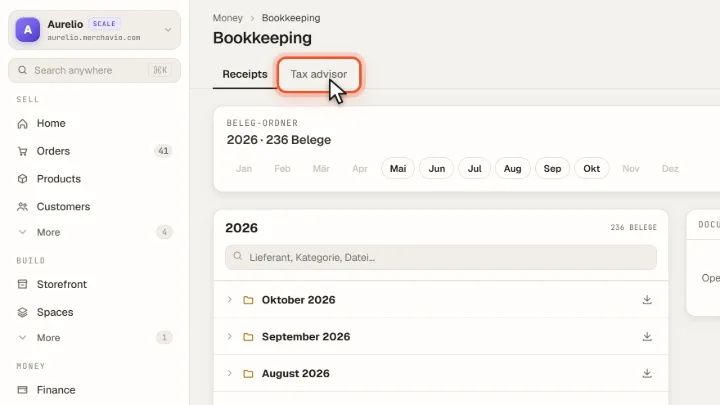
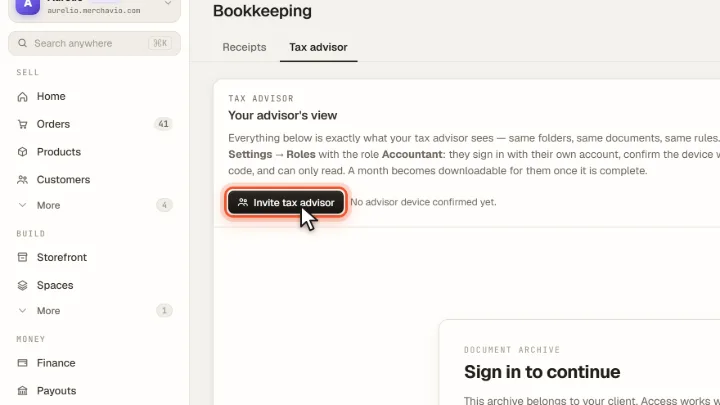
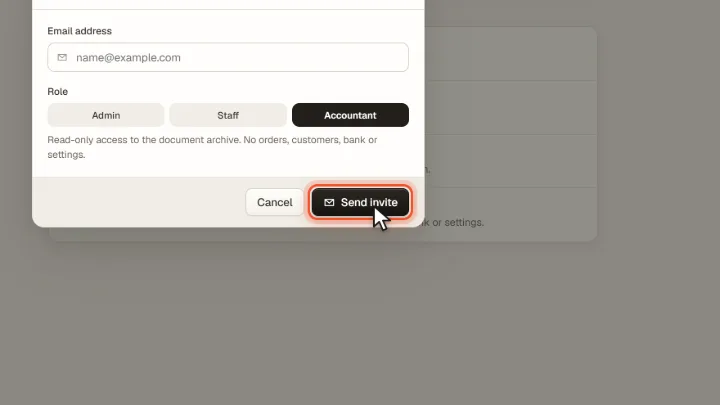
Screenshots from Merchavio with sample data. The coloured frame shows where to click.
Open Tax advisor
Open Bookkeeping and click the Tax advisor tab. Below you see exactly what your tax advisor will see: the same folders, the same documents, the same rules.
Open the invitation
Invite tax advisor takes you to Settings → Team.
Choose the role Accountant
Click Invite member, enter your tax advisor's email address, choose the role Accountant and click Send invite. Merchavio sends an invitation email; if that is not possible, it copies an invitation link for you to pass on.
Your tax advisor signs in
Your tax advisor accepts the invitation with their own Merchavio account. On every new device they confirm the login with a one-time code sent by email; a confirmed device stays valid for 30 days.
Keep an eye on the access
In the Tax advisor tab you see every confirmed device with email address and expiry date. A click on ✕ removes that device's access at once. To end the access entirely, remove the person under Settings → Team.
Tips from practice
- Explain when a month is ready. Your tax advisor can download a month from the 4th of the following month, once no document is open and the bank statement is in it. Before that they see the documents but cannot download the ZIP.
Common mistakes
- Sharing your own password. Your tax advisor would then see orders, customers and payouts and could change everything.
- No seat left. The access takes a team seat. Starter has 2 seats including your own; if all are taken, the invitation cannot be accepted.
- Choosing Staff instead of Accountant. Staff works in your dashboard with the permissions you grant. Accountant only sees the document archive.
Frequently asked questions
Can my tax advisor change or delete documents?
No. The role Accountant can only read the document archive and download complete months. Orders, customers, bank and settings are blocked by the server, not just hidden.
Does accountant access cost extra?
No, but it takes a team seat. Starter has 2, Growth 5, Scale 15 and Plus 50 seats, each including your own.
Why does my tax advisor need a code?
A password alone is not enough for a complete document archive. On every new device Merchavio sends a one-time code by email; after that the device stays confirmed for 30 days.