Storefront: overview and guides
Storefront: build your online store for digital products
Storefront is your online store: home page, sales pages, menu, checkout and the area your buyers log into. You design everything with the page builder and themes, on your own domain or at <store>.merchavio.com.
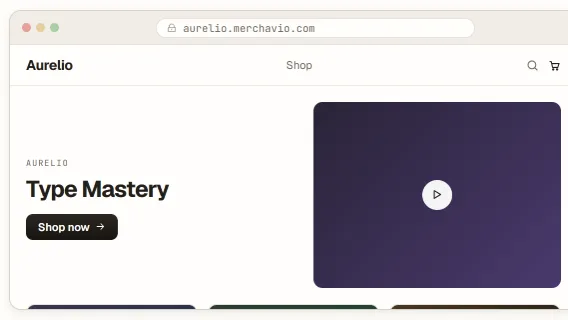
How Storefront works in Merchavio
Every product automatically gets a sales page. You add your own pages, arrange sections in the builder and choose a theme for fonts and colours. Changes are saved as a draft and only go live when you publish.
The tabs Overview, Pages, Navigation, Checkout, Members and Domains each lead to one part of your store. Under Overview you find versions, backups and the theme library.
What you can do in Storefront
- Page builder with sections, live preview, desktop and mobile
- Ready-made blocks and templates: designed sections or whole storefronts in your colours
- Theme library, versions and backups
- Own pages, menus and footer
- Checkout in your look, with Stripe
- Member area that builds itself from what buyers own
- Own domain with SSL, password protection before launch
- Import of page titles and prices from your old website (beta)
Guides for Storefront
Design your store with the page builder
Design your store with sections.
Open guide →Choose a theme for your store and go live safely
Choose a look, try it safely, go live.
Open guide →Add pages to your store
Add your own pages to the store.
Open guide →Set up the menu and footer of your store
Main menu, footer and affiliate portal.
Open guide →Design the checkout for your digital products
Checkout in your look, with Stripe.
Open guide →Set up the member area for your buyers
The library your buyers log into.
Open guide →Connect your own domain to your store
Connect your domain, protect with password.
Open guide →Migrate your online store from another platformBeta
Takes over page titles and prices it finds.
Open guide →Frequently asked questions
Do I need my own domain?
No. Every store gets a free address at <store>.merchavio.com. You can connect your own domain at any time.
Can my buyers install the store as an app?
Yes. Store and community can be installed on phones as a web app with your name and icon, without an app store.
How do I label AI-generated images?
Under each image in the builder and under the product image there is a checkbox "AI-generated image". With it, your store shows a small "AI-generated" label on the image, in the language of your store. If the file data of an uploaded image says it was made with AI (for example with ChatGPT, Gemini, Firefly, Midjourney or Stable Diffusion), Merchavio ticks the box for you. Screenshots or re-saved images often lose that data, then tick the box yourself.