Analytics: overview and guides
Track store revenue: orders, channels and top products per period
When you track store revenue, the figures only tell you something if they all cover the same period and you can compare them with the period before. The Overview tab in Analytics shows revenue, orders, order value, refund rate and subscriptions for the period you choose, and how each figure changed.
When to look at your revenue
Look at the overview after a launch, a discount campaign or at the end of a month. The comparison with the previous period shows whether a campaign brought extra sales, and the channel split shows whether buyers came from your storefront, the marketplace or affiliates.
The steps in Merchavio
Screenshots from Merchavio with sample data. The coloured frame shows where to click.
Choose the period
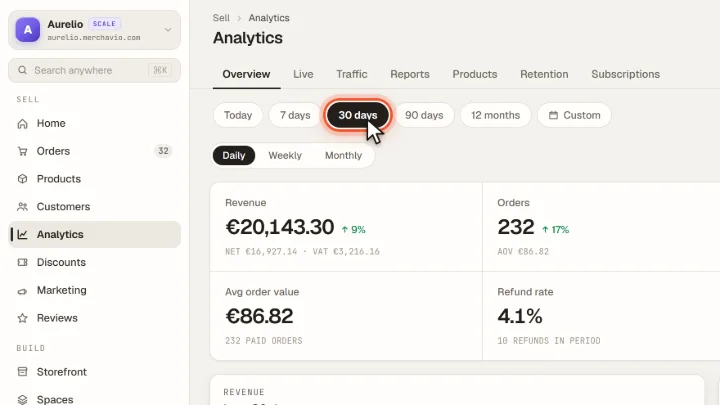
Open Analytics (under More in the sidebar); the Overview tab opens. Choose Today, 7 days, 30 days, 90 days, 12 months or Custom with a calendar.
Compare with the period before
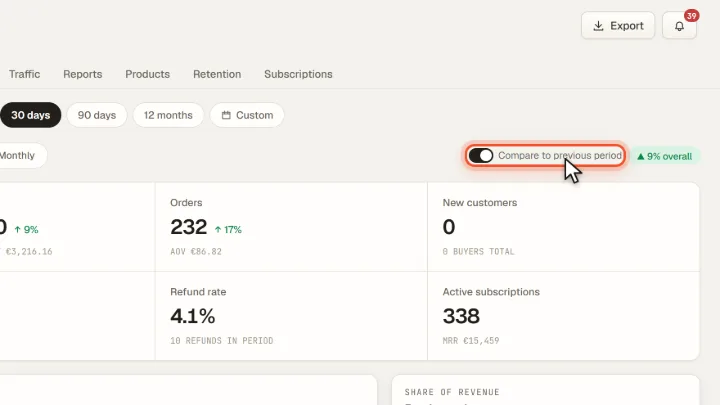
Switch on Compare to previous period. Every figure then shows the change against the period of the same length before: Revenue, Orders, New customers, Avg order value, Refund rate and Active subscriptions.
Sales channels and top products
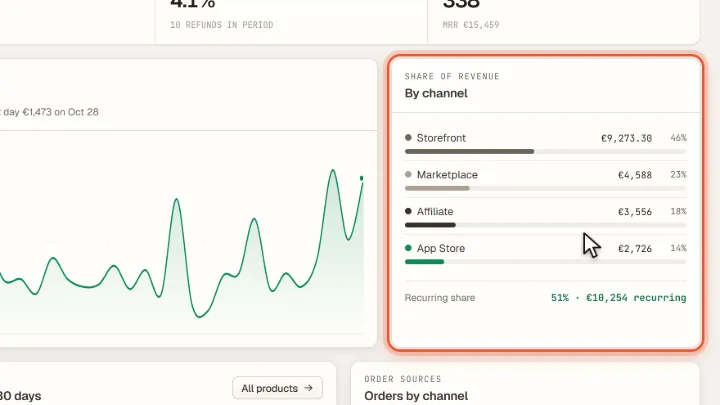
Below you see revenue over time and By channel: storefront, marketplace and affiliate. Top products lists your products by revenue, Orders by channel the number of orders per channel.
Export the figures
Export at the top right downloads a CSV file with every product, its type, units sold and revenue in the chosen period.
Tips from practice
- Compare equal periods. 30 days against the 30 days before is a fair comparison; a single day says little when you have few orders.
Common mistakes
- Taking the net figure as exact. Net and VAT in the revenue tile are estimated at 19 %. For your VAT return, the amounts per order count.
- Not marking test orders. A test purchase counts as revenue until you turn on its switch in the Test purchase column under Orders. After that it no longer counts in revenue, the conversion rate or other figures; your bookkeeping keeps it, because real money was paid.
Frequently asked questions
Is revenue shown gross or net?
The large figure is gross revenue including VAT. Below it you see net and VAT, estimated at 19 %.
Which orders count as revenue?
Paid orders in the chosen period.