Analytics: overview and guides
Manage subscriptions: pause, resume, cancel and reactivate
To manage subscriptions you need two things: the figures for all of them and quick access to a single one. The Subscriptions tab shows both, and the actions run directly through Stripe.
When to manage subscriptions by hand
Usually subscriptions run by themselves: Stripe charges each cycle and buyers can cancel themselves. You step in when a buyer asks you to pause, wants to undo a cancellation or when you end a subscription yourself, for example because you discontinue a product.
The steps in Merchavio
Screenshots from Merchavio with sample data. The coloured frame shows where to click.
Open Subscriptions
Open Analytics and click the Subscriptions tab.
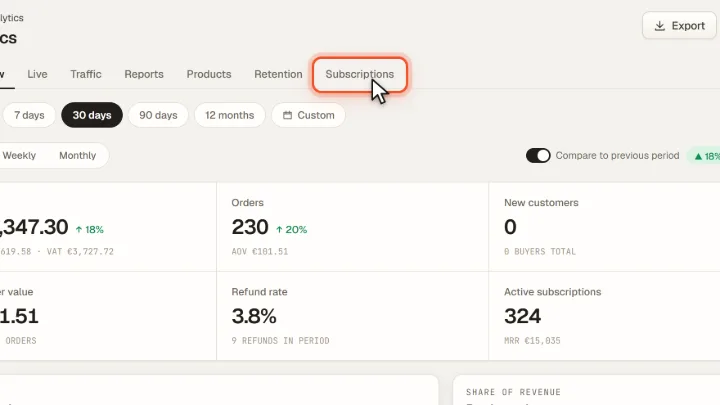
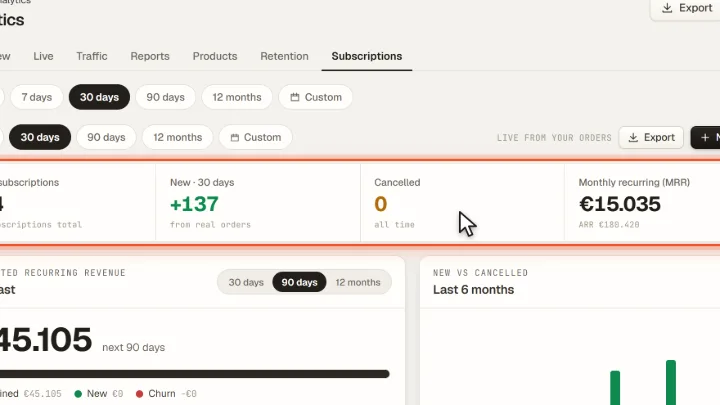
Read the key figures
At the top you see Active subscriptions, new subscriptions in the period, Cancelled and the Monthly recurring (MRR) revenue with the yearly value. Below are a forecast based on the current MRR, new versus cancelled subscriptions and the renewals of the next 14 days.
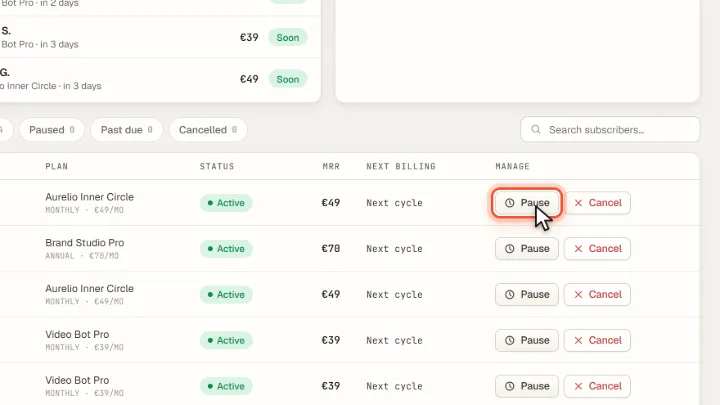
Manage a subscription
In the list you filter by Active, Paused, Past due or Cancelled and search by name, email or plan. Pause stops the payments, Resume restarts them, Cancel ends the subscription at the end of the period and Reactivate withdraws that cancellation.
Tips from practice
- Offer a pause before a cancellation. If a buyer only needs a break, Pause keeps the subscription instead of losing it.
- Watch Past due. These are subscriptions whose payment failed; Stripe retries automatically.
Common mistakes
- Cancelling in the Stripe dashboard. Annual subscriptions in Merchavio run on a schedule (one year, then monthly). Cancel them here, so Merchavio releases the schedule correctly.
Frequently asked questions
Does the buyer keep access after a cancellation?
Cancel ends the subscription at the end of the paid period, so the buyer keeps access until then. Reactivate withdraws the cancellation before that date.
Which subscription figures need the Growth plan?
The list with all actions, the key figures and the forecast are in every plan. MRR movement, the six-month trend of new and churned subscriptions and retention cohorts start with Growth.
Related guides
Set prices and subscriptions for digital products
One-time, monthly, annual or free.
Read →Discounts · GuideHow to offer a free trial for your membership
Free days before the subscription starts.
Read →Customers · GuideUse the customer list: members, buyers and lifetime value
Find customers and see their value.
Read →