Discounts: overview and guides
How to offer a free trial for your membership
If you offer a free trial for your membership, new members get access right away and the first payment is only due after a set number of days. If they cancel before, they pay nothing; otherwise the subscription simply continues. In Merchavio the trial is not set on the product but created as a discount, so you can start and stop it without touching your prices.
When a free trial makes sense
A trial works best when the value shows within days: a community with daily posts, a course membership with new lessons, a tool people use right away. For a one-time download it does not fit, because the content is delivered at once and cannot be returned.
The steps in Merchavio
Screenshots from Merchavio with sample data. The coloured frame shows where to click.
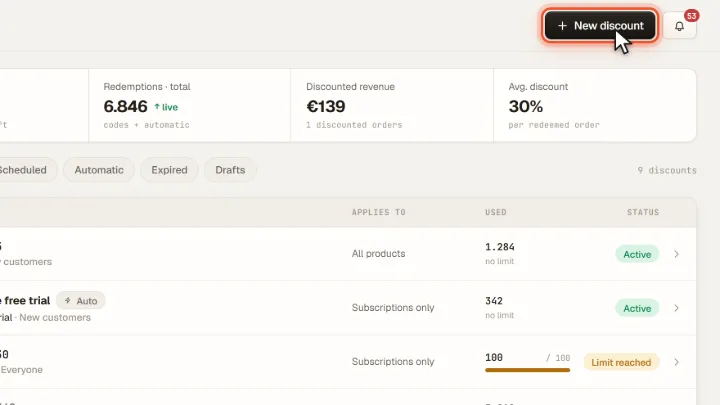
New discount
Open Discounts and click New discount.
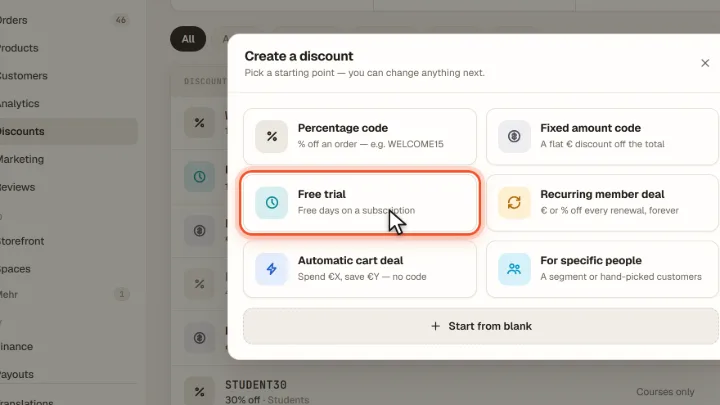
Choose Free trial
Choose Free trial. The preset is automatic, applies to Subscriptions only and to New customers.
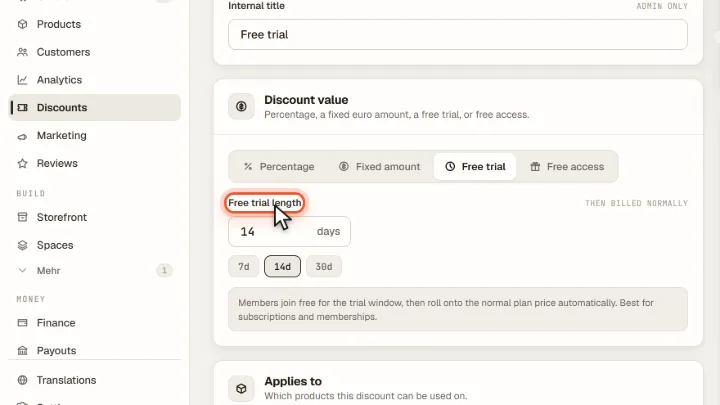
Set the length
Under Free trial length enter the number of days, between 1 and 365. After that the subscription is billed normally. Click Publish.
Tips from practice
- Keep the trial short. 7 or 14 days are enough to try a community; a long trial delays your first revenue.
- Mention the trial on the product page, so visitors know before checkout that they start for free.
- It works for monthly and annual plans. In both cases the trial only moves the first payment back; the price stays the same.
Common mistakes
- Running an automatic cart deal at the same time. Only one discount applies per checkout, and an automatic discount with a saving takes precedence over the trial.
- Expecting the trial with a code. A buyer who enters a discount code gets the code, not the automatic trial.
Frequently asked questions
Do members have to enter payment details for the free trial?
Yes. In the Stripe checkout they choose a payment method, but nothing is charged until the trial ends.
What happens when the free trial ends?
Stripe charges the first regular payment automatically. If the member cancels before, no payment is made.
Who gets the free trial?
With the preset, new customers who buy a subscription. Merchavio checks at checkout whether the email address already has a paid order.
Related guides
Manage subscriptions: pause, resume, cancel and reactivate
Pause, resume, cancel or reactivate.
Read →Spaces · GuideCreate a paid community and connect it to your store
Community as a product with monthly price.
Read →Products · GuideSet prices and subscriptions for digital products
One-time, monthly, annual or free.
Read →