Discounts: overview and guides
How to set up an automatic discount without a code
An automatic discount without a code applies by itself as soon as the cart meets a condition, for example €20 off from €120. Buyers do not have to know or type anything; they see the lower price in the cart. The aim is that buyers just below the threshold add one more product.
When an automatic discount makes sense
Use it when you sell several products that fit together, such as a course and a workbook: the threshold makes the second product worth it. It also suits public sales such as a launch week, where a code would only be an extra step. Instead of an amount you can also require a number of items, for example two e-books.
The steps in Merchavio
Screenshots from Merchavio with sample data. The coloured frame shows where to click.
New discount
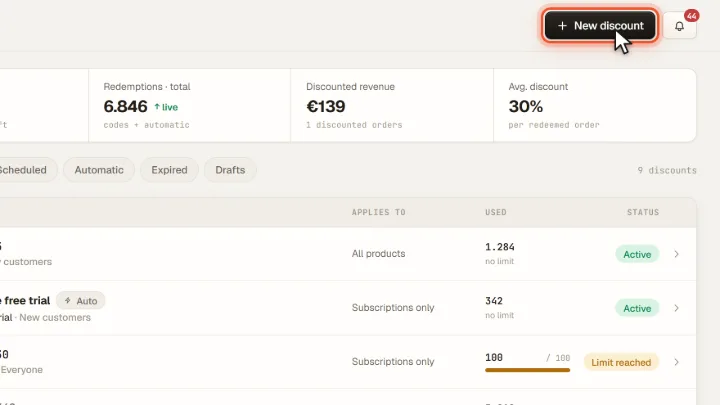
Open Discounts and click New discount.
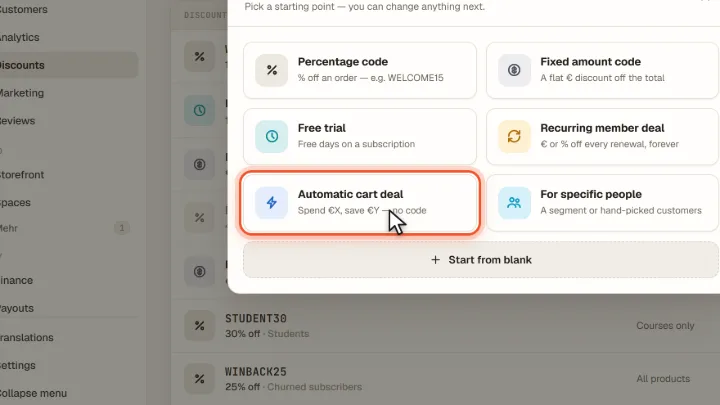
Choose Automatic cart deal
Choose Automatic cart deal. How it applies is set to Automatic, so no code is needed.
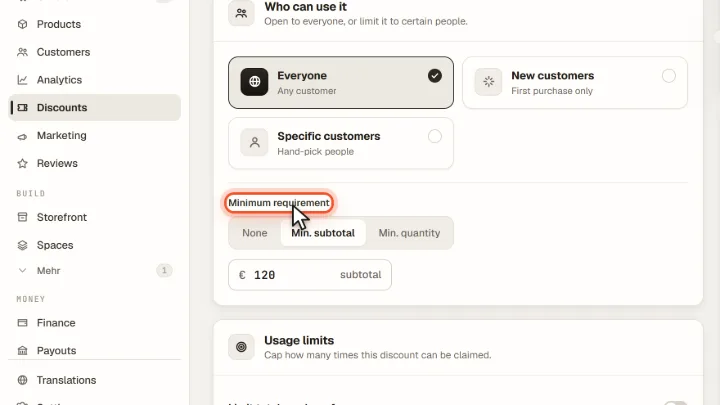
Set value and minimum
Enter the discount and under Minimum requirement choose Min. subtotal or Min. quantity. The discount applies in the cart as soon as the condition is met. Click Publish.
Tips from practice
- Set the minimum just above your typical order. Merchavio shows the average order value under Analytics.
- Name the deal clearly, for example "Bundle boost": the name appears for buyers instead of a code.
Common mistakes
- Running several automatic deals and expecting all of them. Only the one with the biggest saving applies.
- Forgetting the end date. An automatic discount reduces every matching order until it ends or reaches its limit.
Frequently asked questions
What is a minimum order value?
The amount the cart has to reach before the discount applies. In Merchavio Min. subtotal counts the whole cart before the discount; Min. quantity counts the items the discount applies to.
Does an automatic discount apply if the buyer enters a code?
No. An entered code takes precedence; only one discount applies per checkout.
Can I limit how often an automatic discount is used?
Yes. Usage limits work for automatic discounts too: a total number of uses and one use per customer. Once the limit is reached, the discount stops applying.
Related guides
How to create a coupon code for your online course
Percent or euros, with limit and period.
Read →Products · GuideOrder bump: offer an add-on at checkout
Offer an add-on product at checkout.
Read →Analytics · GuideTrack store revenue: orders, channels and top products per period
Revenue, orders and channels per period.
Read →