Discounts: overview and guides
How to create a coupon code for your online course
You create a coupon code in the platform you sell through: you set the code, the discount and the rules, and buyers enter it in the cart. The rules decide who may use it, for which course and until when. In Merchavio this takes about a minute for your online course, and the same code can also cover ebooks, communities or coaching. A live preview on the right shows what buyers get before you publish.
When a coupon code makes sense
A code suits offers you hand out on purpose: a launch discount for your newsletter, a thank-you for buyers of your first course, a code for a partner's audience. Unlike an automatic discount, only people who know the code get it. In the app the coupon code is called Discount code.
The steps in Merchavio
Screenshots from Merchavio with sample data. The coloured frame shows where to click.
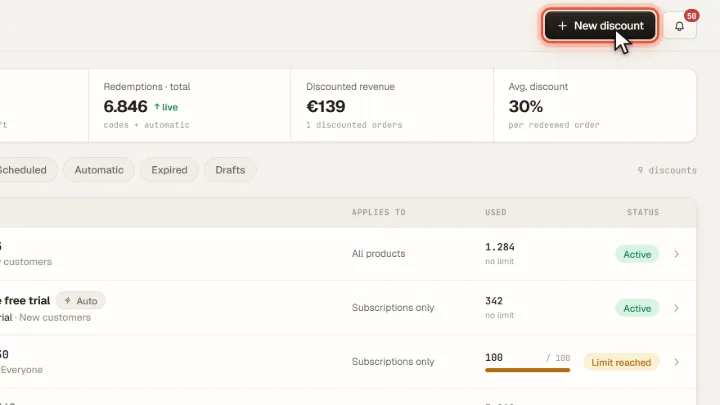
New discount
Open Discounts (under More in the sidebar) and click New discount.
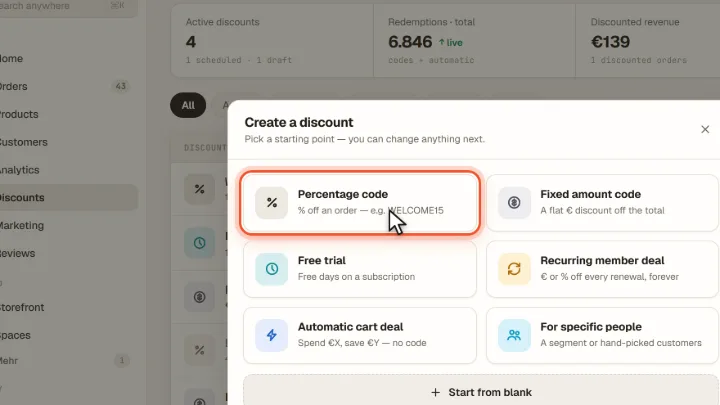
Choose a starting point
Choose Percentage code for a percentage off or Fixed amount code for a fixed euro amount. For subscriptions there is also Recurring member deal.
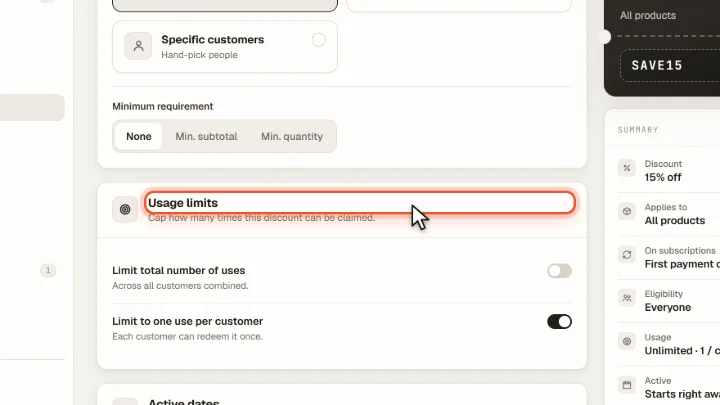
Code, value and rules
Enter the code or click Generate and set the value. Under Applies to choose Specific products and pick your course; under Who can use it you can limit the code to New customers or Specific customers. Under Usage limits and Active dates you set the total limit, one use per customer, start and end.
Publish
Check the summary on the right and click Publish. Save draft keeps the code inactive until you publish it.
Tips from practice
- Use short codes that are easy to type, such as LAUNCH20. Upper and lower case do not matter.
- Give every channel its own code. The Used column then shows which newsletter or partner brought buyers.
- A fixed amount counts once per order, not per product. €10 off stays €10 off, even if the buyer takes two courses.
Common mistakes
- Leaving the code as a draft. A code saved with Save draft does not exist for buyers; the cart reports it as unknown.
- Hiding the code field. If Storefront → Checkout sets the discount field to Hidden, buyers cannot enter any code.
Frequently asked questions
How does a coupon code work?
The buyer enters the code in the cart, Merchavio checks the rules and shows the lower price before payment. Under Storefront → Checkout you choose whether the field is hidden, shown as a "Have a code?" link (default) or always open.
Are coupon codes case-sensitive?
No. launch20 and LAUNCH20 are the same code. Spaces before or after the code are ignored as well.
What does a buyer see if a code does not apply?
A short message in the cart, for example that the code does not exist, is not active yet, has expired or was already used. The order is then placed at the normal price.
Related guides
Create a discount code with the AI assistant
Let the AI draft a discount code and confirm it.
Read →Discounts · GuideHow to set up an automatic discount without a code
From a minimum amount, without a code.
Read →Marketing · GuideWrite and send an email campaign
Write a campaign and send it to your list.
Read →