Settings: overview and guides
Set up taxes: country, customers, VAT and invoices
You sell under your own name and charge and report VAT yourself. Merchavio records the amount and the buyer's country for every order and prepares the reports for your tax advisor.
The steps in Merchavio
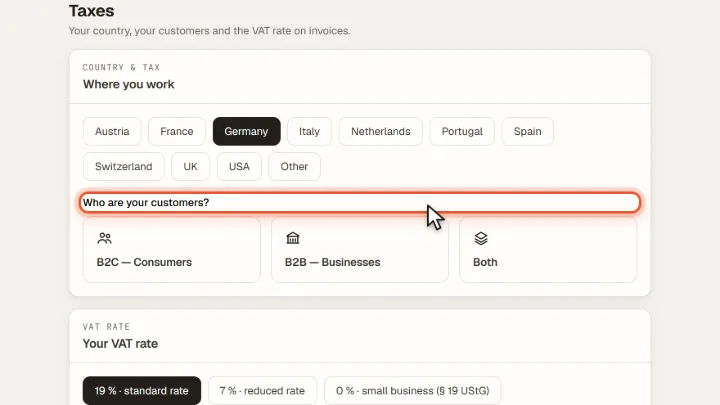
Screenshots from Merchavio with sample data. The coloured frame shows where to click.
Country and customers
Open Settings and then Taxes. Choose the country you work in and whether your customers are consumers (B2C), businesses (B2B) or Both.
VAT rate
Under Your VAT rate pick the rate for your country, or small business if you charge no VAT. Your prices stay final prices; invoices show the VAT contained in them at this rate.
Invoices through Stripe
With Invoices through Stripe switched on (default), Stripe creates an invoice in your name for every sale on your own Stripe account: with your business details from Stripe, Stripe numbering and your VAT ID. The buyer gets it as a PDF link in the purchase confirmation. Stripe charges a fee per invoice.
Frequently asked questions
Does Merchavio file VAT for me?
No. Merchavio is not a merchant of record. It records the figures and prepares reports; filing is done by you or your tax advisor.